Find out in only 2 min
Take the free quiz to reveal the perfect Showit website template for your business!
Which Showit Website Is Right For You?

Get early access to the sale
Black Friday is coming.





One of the most common mistakes I see business owners make with their website is forgetting to setup tracking with Google Analytics. It’s so easy to do, you’ll wish you did it sooner. You may be asking yourself why you even need to install Google Analytics, and here’s why:
Without Google Analytics, you can’t monitor your website traffic, meaning you’re totally blindfolded when it comes to understanding who’s coming to your website and what pages they’re visiting the most.
The most important step you need to take right now is getting GA (Google Analytics) installed on your Showit website so you can start tracking today.
I’m going to walk you through adding Google Analytics to your Showit website which will take about two minutes. After that you’ll have a clear view of who’s visiting your website, how long they stay, what pages they visit, what devices they use and even where they are located.
1. Sign Up for a Google Analytics Account
Google analytics is totally free. You will need to have a Google account in order to create a Google Analytics account, plus there are tons of other business features you may want access to like Google Search Console, Google Ads and Google Keyword Planner.
2. Find Your Tracking Code (Measurement ID)
In Google Analytics, you’ll want to navigate to the Admin section (⚙ gear icon in the bottom left corner),
- Go to the Property Setting section
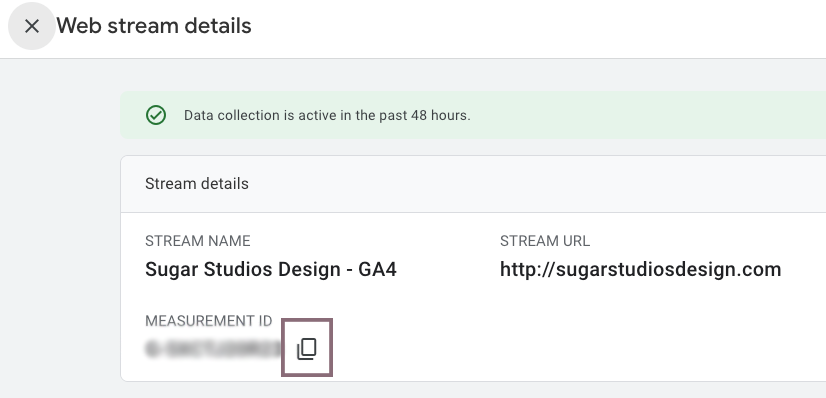
- Select Data Streams (under Data Collection)
- Click on your site to view the details
- Under Measurement ID, click the copy icon to copy the code that starts with “G-“
3. Add the Google Analytics Tracking Code to Your Showit Website
Login to your Showit site and go to the ⚙️ Site Settings section.
- In the pop up, click on the Integrations tab
- In the Google Analytics section, paste in the code you just copied into the Measurement ID field
- Click Save and publish your site

That’s it! You’re now tracking website visitors for your Showit website.
Now you can use the information you see in Google Analytics to watch your website traffic increase over time. If you’re blogging, it’s important to see which blog posts are getting the most traffic (you may be surprised by this!).
Showit + Google Analytics FAQs
My site is brand new and I have no visitors. Why should I add this now?
It’s never too early to add analytics. You’ll want to start monitoring your traffic right now (even if it’s low) so you can see trends, growth and fluctuations over time.
I never added Google Analytics and my site is a few years old, is that ok?
Totally, you won’t get to see past visits, but you can evaluate what’s currently happening with your website visits and learn from that.
Can I track sales conversions with Google Analytics?
You may need to add your GA code to your ecommerce platform (I use ThriveCart and have it connected to my analytics) in order to track sales through Google Analytics. Check with the platform you’re using on where to add the measure ID.
What do you think of this article? Do you have any questions for me? Ask me in the comments box below!





$157 - PAYMENTS AS LOW AS $36.75/MO
Showit Website Template for Health Coach

$157 - PAYMENTS AS LOW AS $36.75/MO
Showit Website Template for Coaches

$157 - PAYMENTS AS LOW AS $36.75/MO
Showit Website Template for Virtual Assistant

$157 - Payments as low as $36.75/MO
Showit Website Template for Coaches



TAKE THE QUIZ
What Is Your Brand Personality?


TAKE THE QUIZ
Find Your Perfect Add-On Page for Your Showit Website!

TAKE THE QUIZ
Find out which Showit website is right for you
Boost Your Business with Fun Quizzes!
Free Quizzes

Next Story
Previous Story


TAKE THE QUIZ
Discover your brand's unique personality + reveal a special offer!
What is Your Brand Personality?




Share Your Thoughts